September 16, 2019
A common UX problem in e-commerce product listings
E-commerce websites often let users change how many items they see per page. This looks like a simple feature, but when it resets the list or moves the user away from their current position, it creates unnecessary friction. This article explains the problem and proposes a better behavior for “items per page” controls.
I recently saw a survey on Twitter about paginated product listings and the classic “show 20, 30, or 40 items per page” control. It sounds like a small detail, but changing that number can seriously damage the browsing experience if the interface moves the customer away from their current position.
This behavior is unfortunately common on the internet. A customer changes the number of items per page, the list reloads, and suddenly they are somewhere else. Sometimes they are sent back to page one. Sometimes they stay on the same page number, but the items have shifted so much that their previous position is gone. Either way, the customer is lost. As someone who regularly buys things online and has worked on product interfaces for years, I think this problem deserves more attention. I have not tested this exact solution with real customers yet, so I will not pretend this is final proof. What I want to do here is define a logical behavior that can be implemented, measured, and validated.
Let’s imagine a customer searching for a product on an e-commerce website. The list has 500 items, with 25 items per page. The customer browses through three pages. In Figure 1, the light cyan items are the items already seen by the customer, the strong cyan items are the current items, and the gray items are items not yet reviewed.
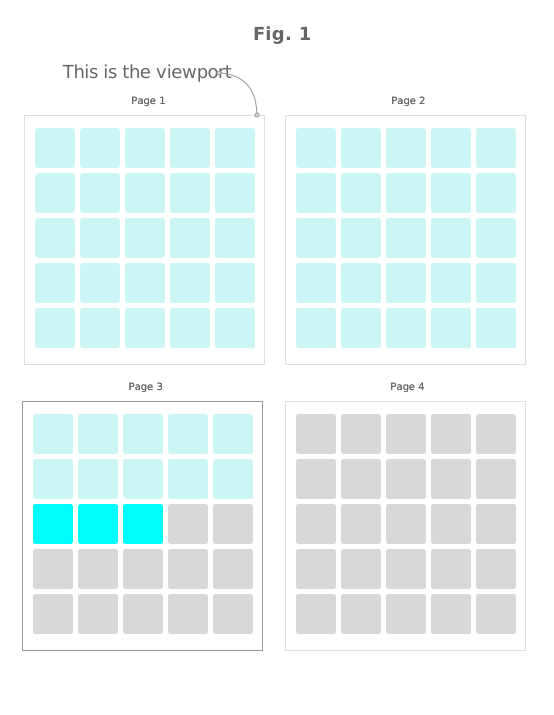
Now the customer decides that 25 items per page is too slow and changes the control to show 100 items per page.
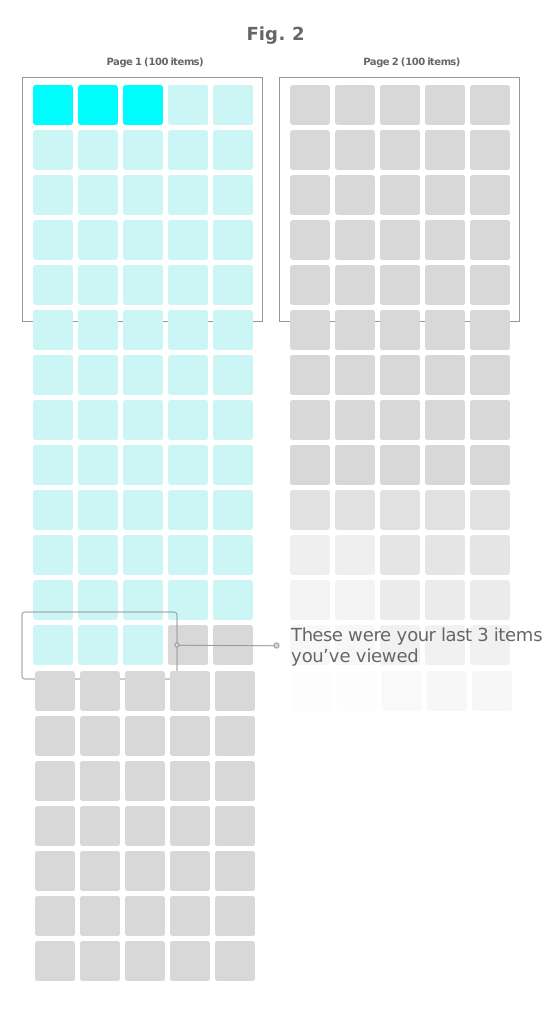
In many websites, this causes the entire listing to reload and sends the customer back to page one, as shown in Figure 2. The customer now sees the first items again, even though those items were already reviewed. The interface has thrown away the customer’s progress. Very polite. Very useless.
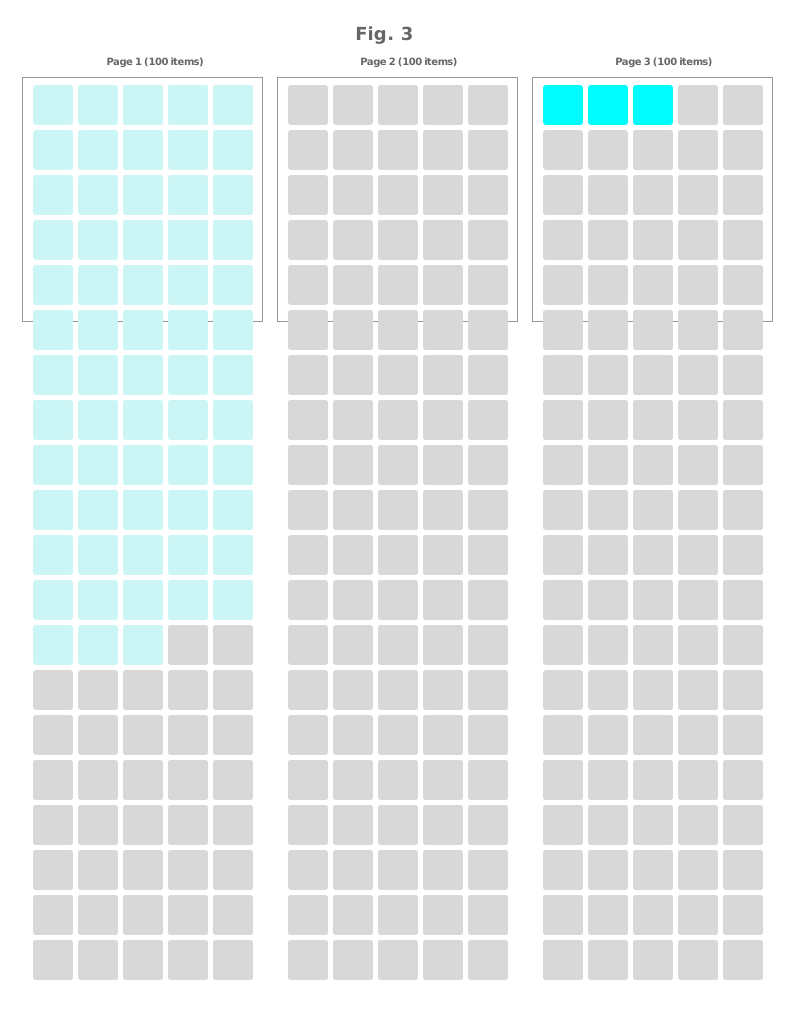
In other cases, the behavior is even worse. The website keeps the customer on the same page number, as shown in Figure 3, but now each page contains 100 items. This means the item the customer was viewing may have moved to a previous page. The customer must go backwards, search for the last item they remember, and rebuild their position manually.
This is one of the most common problems in product listings. It can go unnoticed in design reviews because the feature technically works. The list reloads. The control changes. The new page size is applied. From a system point of view, everything is fine. From the customer’s point of view, it is not fine at all.
If a customer is on page 5 viewing item 223 and changes the list to 100 items per page, item 223 may now be on page 3. The customer must figure out where they were, navigate backwards, and continue from there. Most people are not going to calculate which page contains their last viewed item. They are shopping, not solving a pagination sudoku.
The real question is: what should the ideal behavior be?
To answer that, we need to look at the customer’s intention. When customers change the number of items per page, they usually want to see more or fewer items while staying in their current browsing position. They are not asking to restart the search. They are not asking to lose their place. They are asking for a denser or lighter view from where they already are.
That means the listing should preserve the current position.
For example, if the customer has been browsing with 25 items per page and changes the control to 100 items per page, the current page should expand by adding 75 more items after the current set, as shown in Figure 4. Previous pages should remain as they were, with 25 items per page. Following pages should use the new setting of 100 items per page, unless the customer changes the preference again.
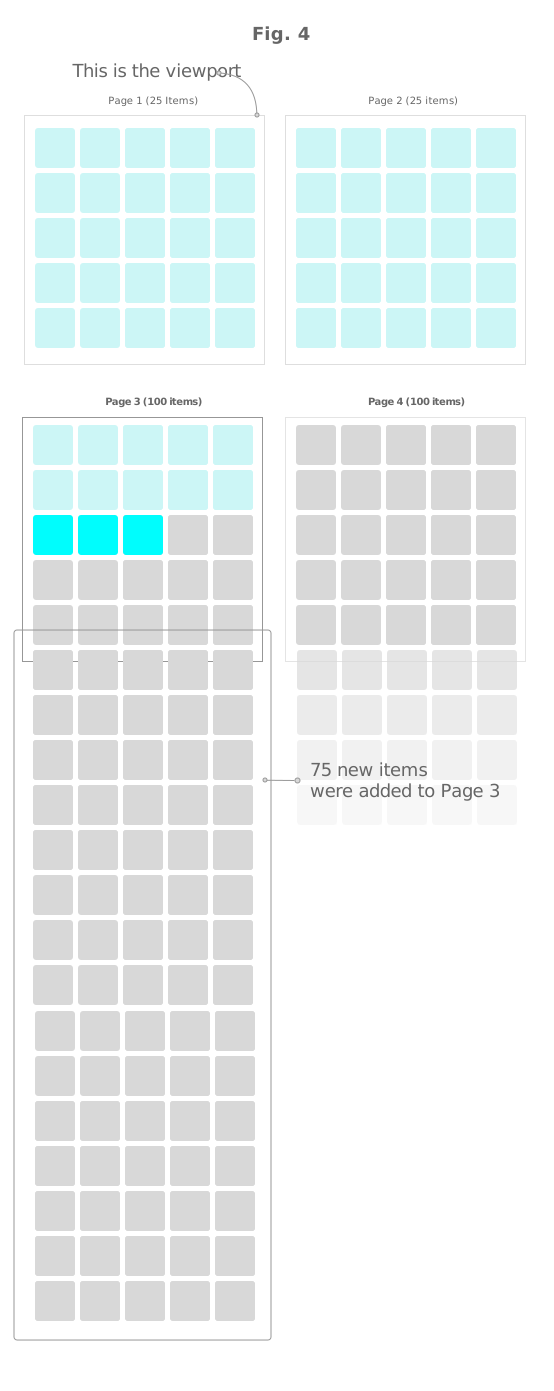
In Figure 4, the solution is simple: the customer stays in the same position. The page may reload, or it may update dynamically, but the browsing context is preserved.
The customer can go back and see the same items they already reviewed. They can keep moving forward and see the new items added to the current page. From that point onward, the list uses the new page size. The interface adapts to the customer instead of asking the customer to adapt to the interface.
In an ideal implementation, the customer would not experience a full reset. If they change from 25 to 100 items per page, the interface should add the missing 75 items to complete the current page. If they change from 100 back to 25, the current page should be trimmed back to the selected amount while preserving the browsing context as much as possible. Previous pages should not be recalculated and moved around. The user’s history should remain stable.
This interaction is better for several reasons.
First, the customer does not lose progress. They are not sent back to page one with 100 results. They remain in the same browsing area, with the selected page size applied from that point forward.
Second, the customer’s memory still works. If they already reviewed two pages of products, those pages remain predictable. We do not punish the customer for using the interface.
Third, the behavior supports repeated changes. A customer can switch from 25 to 100, then later return to 25, and the system can update the current and following pages without destroying the full browsing path.
To summarize, a good “items per page” interaction should follow these rules:
- Never reset the customer’s progress completely.
- Keep the customer in the same browsing position.
- Expand or trim the current page according to the selected amount.
- Keep previous pages stable whenever possible.
- Apply the new item count to the current and following pages.
- If the customer changes the setting again, update from that point forward.
These rules are specific to pagination density controls. They do not apply to every filter.
If a customer changes a meaningful filter, such as price, size, brand, category, rating, or availability, a reset is usually correct. The result set has changed. The previous browsing path may no longer be valid because the items themselves may be different.
But “items per page” is not the same kind of change. It does not change the result set. It changes how much of the same result set is shown at once.
That distinction matters.
When the customer changes the number of items per page, the interface should not behave as if the search has started again. It should preserve the customer’s position, protect their progress, and let them keep browsing without turning a simple control into a small act of punishment.